

In this article
- 1. What is AI for Everyday Work?
- 2. How to Use AI Responsibly at Work?
- 3. What are the Simple Ways to Start Using AI at Workplace?
- 4. How AI Supports Different Domains?
- 5. What is the Future of Everyday Work with AI?
- 6. What are the Common Mistakes to Avoid While Using AI at Workplace?
- 7. Practical AI Usage FAQs
Artificial Intelligence is no longer a complex technology limited to highly technical tasks. Today AI has become a part of everyday work helping professionals, freelancers, students and business owners to automate tasks, save time and complete routine tasks efficiently.
From providing insightful answers to drafting e-mails, summarizing meetings, brainstorming and creating reports, AI can support many parts of our everyday work life.
Adopting practical AI tools is a simpler way for professionals and businesses to improve productivity rather than completely changing the workflows.
What is AI for Everyday Work?
AI for everyday work refers to using artificial intelligence tools to assist with everyday professional and administrative tasks. It can help generate ideas, automate repetitive tasks, process information and act as a starting point for different types of work.
Some of the common activities that AI can support are,
- Drafting an e-mail
- Organizing information
- Analysing data
- Create reports
- Generate ideas
- Manage repetitive administrative works
- Translate or rewrite contents
- Create presentations
The main goal is to make humans spend less time on repetitive tasks and involve them in activities that require human judgement, creativity and decision-making.
How to Use AI Responsibly at Work?
AI can improve productivity at work, but using it effectively requires good judgement.
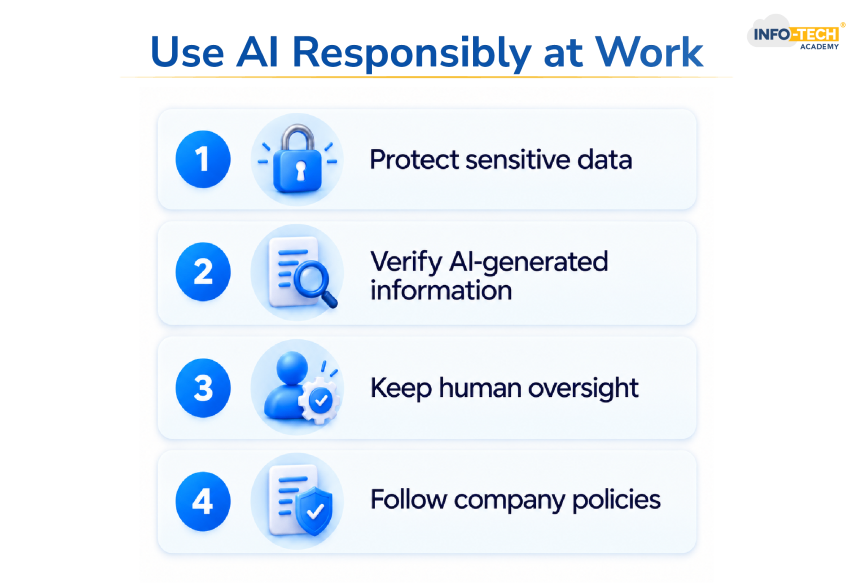
Protect Sensitive Data:
Do not provide any sensitive information like the company’s confidential data, financial information, personal data, passwords and other sensitive materials unless your organization’s policies and the AI tools data protection permits it.
Verify AI Generated Information:
Artificial Intelligence can sometimes generate inaccurate or hallucinated information confidently. Always verify important facts before using them in reports, communications, presentations and decisions.
Human Oversight is Important:
AI should support professional judgement instead of automatically replacing it. People should always be responsible to check important information and make final decisions.
Company Policies:
Companies should establish clear guidelines on how to use AI, including approved tools, security and data handling.
What are the Simple Ways to Start Using AI at Workplace?
You don’t need to change your entire workflow to start using AI at workplace. Initially, you can try using AI to do repetitive tasks like,
- Mail drafting
- Summarize a document
- Create a meeting agenda
- Create a task list
- Proofread a document
- Brainstorm ideas for projects and
- Organize information
You can also use AI as a learning partner to build skills in areas such as writing, coding, creativity and data analysis.
How AI Supports Different Domains?
AI is not limited to a single industry or a type of work. AI supports professionals across various domains helping them automate tasks, save time, analysing information and make better decisions.
Accounting and Finance:
Finance teams can use AI to analyse data, financial reporting, document structuring, expense categorization and identify unusual patterns in the financial data.
Marketing and Advertising:
Marketing and Advertising is one key area where AI can provide immense support. Professionals can use AI for content ideas, audience research, campaign planning, designing the advertisements and performance analysis.
Human Resources:
Human Resource teams can use AI for recruitment and other employee related administration activities. Organisations should ensure that recruitment or any other employee related decisions are taken with appropriate human review.
IT Software Development:
AI is increasingly used in IT and software development for code assistance, debugging, documentation, testing and technical support.
Developers can get code suggestions from AI. But they should ensure to review and test the output before using them in the production systems.
What is the Future of Everyday Work with AI?
AI is becoming a practical part of everyday professional workflow. Taking an AI course can help professionals understand practical AI applications and use AI tools confidently at workplace.
Register NowThe value of AI is not determined just by its automation capabilities. Instead, it can help people work faster, reduce repetitive works and focus more on higher-value activities.
The productive approach is not just to use more AI. But it must be used more efficiently at places where they can genuinely improve the way the work gets done.
Also Read: AI Training: How It Helps With Career Growth
What are the Common Mistakes to Avoid While Using AI at Workplace?
Avoid entering sensitive company information, passwords, financial information, personal data and other confidential documents without proper approval.
AI-generated information is not always accurate. Always review important facts, calculations and references before using them.
Employees should use only the approved AI tools and follow the organisation’s guidelines for data security and privacy.
AI generated e-mails, presentations, reports and other contents should not be used directly. Review, edit and then use them to ensure accuracy and relevance.
The best way to use AI at workplace is to treat them as supporting tools and keep human judgement, review and responsibility at the centre of the workflow.
Practical AI Usage FAQs
What is practical AI?
Practical AI refers to using artificial intelligence tools for everyday activities like drafting e-mails, generating ideas, summarizing documents and creating reports.
Can AI replace employees at workplace?
AI is mainly used to support employees by automating repetitive tasks and information processing. However, human judgement and oversight remain important for decision making and responsibilities.
What should employees check before using AI-generated content?
Employees should accuracy, relevance, tone, facts and confidential information before using AI-generated content.
Should companies have guidelines for using AI?
Yes, companies should have clear guidelines for using AI to help the employees understand which AI tools are approved and how company data, security, privacy and AI-generated contents should be handled.

Transforming thoughts and concepts into clear, compelling words is a powerful tool that connects people. While writing boosts my creativity, reading broadens my perspective and sharpens my understanding of language and narration.