

In this article
- 1. What Are AI Tools?
- 2. How Do AI Tools Work?
- 3. What are the Types of AI Tools (With Examples)?
- 4. What are the Benefits of Using AI Tools at Work?
- 5. What are Some Real-Life Examples of AI Tools in Workplaces?
- 6. Are Free AI Tools Worth Using?
- 7. How to Start Using AI Tools at Work?
- 8. AI Tools FAQs
Chances are, you used AI at least once this week. Maybe Gmail finished a sentence for you, or asked ChatGPT to fix an email before it went out to a client. It’s become that normal, whether you’re at an MNC in KL or running a small shop in Ipoh.
The problem is there are now hundreds of these apps, and most articles make them sound more complicated than they are. This post walks through what they are, the different types, why they’re useful and how real offices are using them.
What Are AI Tools?
An AI tool is any app that uses artificial intelligence to do work you’d normally have to think through yourself. Writing a reply, summarising a 40-page report, turning notes into slides, transcribing a meeting. That kind of thing.
Some tools are built entirely around AI, like ChatGPT, Claude and Perplexity. Others are apps you already know that have added AI on top, such as Canva making slides from a prompt or Copilot inside Word and Excel. Honestly, the difference matters less every year, because almost every app you pay for now has some AI feature in it.
How Do AI Tools Work?
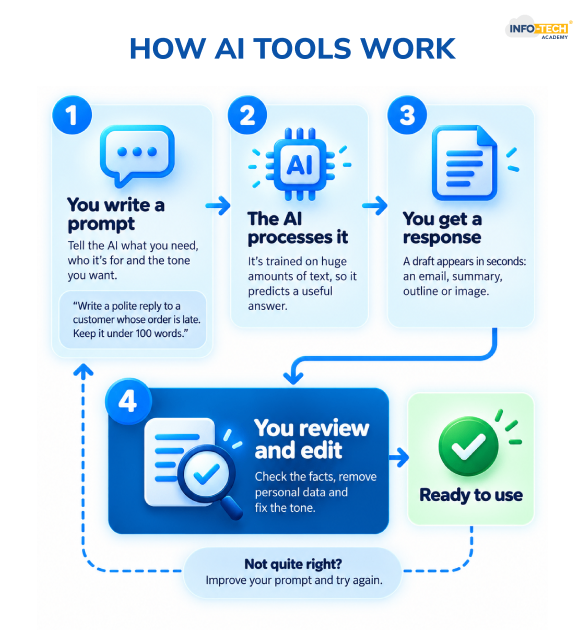
Most of them run on something called a large language model (LLM). It’s trained on a massive amount of text, so it picks up how people write and can guess what a good answer to your question looks like. Image and video tools are trained the same way, only on pictures and clips.
You type what you want, which is called a prompt, and it replies. How good that reply is depends a lot on you. Ask it to “make this better” and you’ll get something vague back. Tell it the email is for an unhappy customer, should sound polite but firm and stay under 100 words, and the difference is obvious. Asking properly is a skill on its own, and it’s what our Smart Prompting Course covers.
What are the Types of AI Tools (With Examples)?
There’s no official list, but most tools fall into one of these groups.
| Type | What it’s used for | Popular examples |
| AI chatbots and assistants | Writing, brainstorming, summarising, answering questions | ChatGPT, Claude, Gemini, Microsoft Copilot |
| AI search and research | Finding answers with sources you can check | Perplexity, NotebookLM |
| Writing and grammar | Fixing grammar and tone, writing marketing copy | Grammarly, Jasper |
| Presentations and visuals | Turning rough notes into slides and diagrams | Gamma, Canva, Napkin |
| Image and video | Creating images, editing video through the script | Midjourney, Descript, Runway |
| Voice and audio | Voiceovers, dictation, text to speech | ElevenLabs, Wispr Flow |
| Meeting assistants | Recording and summarising calls | Fathom, Granola, Fireflies |
| Automation and AI agents | Linking apps and running multi-step tasks for you | Zapier, n8n, Manus |
| Coding and app builders | Building apps or websites from plain English | Cursor, Lovable, Replit |
| AI in business software | Smarter HR, accounting and sales systems | HRMS, accounting and CRM platforms |
What are the Benefits of Using AI Tools at Work?
Mostly, AI saves you from the first draft and the boring admin. You still do the thinking, it just gets you to the starting line faster. A few ways that shows up at work:
- Writing emails, reports and proposals without staring at a blank page for 20 minutes
- Reading a summary of a long document first, then only digging in where it matters
- Researching faster, with tools like Perplexity showing the source behind each answer
- Switching between English, BM and Mandarin without waiting for someone to translate
- Putting together a decent slide deck or poster even if you’ve never used a design app
- Covering work a small team can’t hire for yet, like basic copywriting or data clean-up
What are Some Real-Life Examples of AI Tools in Workplaces?
None of these are fancy. That’s kind of the point.
| Role | Task | How AI gets used |
| HR executive | Job ads, onboarding guides, leave and payroll checks | A chatbot writes the first draft, and the HRMS catches payroll mistakes or odd leave patterns |
| Sales team | Following up after client calls | A meeting assistant writes up the call and lists next steps to update in the CRM |
| Accounts | Month-end reports | AI explains a tricky Excel formula, spots numbers that look off and drafts a short note for the boss |
| Marketing | Weekly social media posts | Canva or Gamma turns a brief into visuals, then a chatbot writes captions in English and BM |
| Business owner | Endless WhatsApp and email enquiries | An automation tool sorts messages and sends standard replies or reminders on its own |
| University student | Revising from long readings | NotebookLM answers questions based only on the notes and PDFs they upload |
For HR, accounts and sales, a lot of the AI is already sitting inside the systems they log into every day. It only helps if people know their way around those systems in the first place. That’s why we run Info-Tech HRMS training, Info-Tech Accounting Software training and Info-Tech CRM software training.
Are Free AI Tools Worth Using?
Yes, especially when you’re just starting out. The free versions of ChatGPT, Claude, Gemini and Perplexity are more than enough for everyday writing and research. NotebookLM costs nothing if you want to study your own PDFs, and Grammarly’s free plan handles basic grammar.
At some point you’ll hit limits on messages or credits, and the newest models usually sit behind a paywall. If that starts happening every week, a paid plan (most are about USD 20 a month) makes sense. If not, stick with free.
Risks and Limitations of AI Tools
AI gets things wrong, and it won’t tell you when it does. A few things to watch out for:
- It can invent facts, figures or sources that sound completely believable, so check anything that matters.
- Don’t paste customer data, staff details or confidential files into public tools. The PDPA still applies, and your company may have its own rules on this.
- Raw AI writing tends to sound flat. Edit it until it sounds like you.
- It’s easy to stop thinking for yourself. At the end of the day, your name is on the work, not the AI’s.
How to Start Using AI Tools at Work?
Don’t try to learn ten apps at once. Pick one thing you do every week that feels repetitive, like writing meeting notes or answering the same customer questions. Use one assistant for just that task for a couple of weeks. Be specific when you ask, check what comes back, and only add another tool when you have a real reason to.
If you’d rather learn with a trainer, these might help:
- AI course for Beginners is a one-day intro for people who haven’t really used AI yet.
- AI course spends two days on Claude, ChatGPT, Google Gemini and Microsoft Copilot, so you can see which one suits your work.
- ChatGPT course is a one-day course if ChatGPT is your main tool.
- Office Skills course is a good place to begin if you want to get comfortable with everyday digital tools first.
One tool used properly will do more for you than a dozen you open once and forget.
Register NowAI Tools FAQs
What are the top 5 AI tools?
The top 5 AI tools right now are ChatGPT, Claude, Google Gemini, Microsoft Copilot and Perplexity.
Which AI tool is best for paraphrasing?
QuillBot is the best-known tool built just for paraphrasing.
How is Gen Z using AI tools?
Gen Z uses AI tools as part of everyday life, not just for work. Many use ChatGPT or Gemini instead of Google to get quick answers, and to break down tough topics before exams.
Which AI tool is better than ChatGPT?
It depends on what you need it for, since no single tool beats ChatGPT at everything. Claude is often better for long documents and natural-sounding writing. Perplexity wins for research because every answer shows its sources. If your office runs on Google Workspace, Gemini fits more smoothly into Gmail and Docs. Copilot does the same for Word, Excel and Outlook.

Transforming thoughts and concepts into clear, compelling words is a powerful tool that connects people. While writing boosts my creativity, reading broadens my perspective and sharpens my understanding of language and narration.