


In this article
- 1. What Does AI Content Creation Mean?
- 2. Why Does AI Content Sometimes Feel Fake?
- 3. Which Parts of Content Creation Should I Let AI Handle?
- 4. How Do I Get AI To Write in My Brand’s Voice?
- 5. How Do I Make an AI Draft Sound More Human?
- 6. How Do I Make Sure AI Content Is Accurate and Safe to Publish?
- 7. Which AI Tools Are Best for Content Creation?
- 8. AI Content Creation FAQs
AI can give you a blog draft, ten Instagram captions and an email sequence before your coffee gets cold. That part is easy. The difficult part is making sure the content still sounds like you wrote it and not like every other brand that uses the same tools.
If you’ve ever read a post and thought “this was definitely written by ChatGPT,” you already know what the problem is. Readers can tell the difference, and once they can, they stop trusting what you write.
This guide walks through how to use AI to save time without giving up the voice and personality that make people follow you and build trust in the first place.
What Does AI Content Creation Mean?
It’s using tools like ChatGPT, Claude, Google Gemini or Microsoft Copilot to help you plan, write, edit and repurpose content. Be it a blog post, a LinkedIn update, product descriptions for your Shopee store, an email newsletter or a video script.
The important word to note here is help. AI is great at getting you from a blank page to a rough draft. But, it’s not great at knowing your customers, your opinions or the story behind your business. That must still come from you only.
If you’re completely new to this and not sure where to start using AI efficiently, our AI for Beginners Course covers the basics in a single day.
Why Does AI Content Sometimes Feel Fake?
Most of the time it’s not the tool’s fault, it’s how you use the tool. AI writes based on patterns from huge amounts of existing content, so if you give it a vague prompt, you get the most average answer possible. Here’s what usually gives it away:
- Redundant phrases over and over: Words like “elevate,” “unlock” and “in today’s digital landscape” show up in thousands of posts.
- No real experience: It can explain how to run a promo, but it can’t tell readers what happened when you ran one last Raya.
- Missing local context: It doesn’t know your customers in Ipoh shop differently from those in Bangsar, or that your audience switches between English and BM mid-sentence.
- No opinion: AI tends to sit on the fence. People follow brands that actually take a stand.
- False facts: It can confidently make up stats, quotes or sources without any reference or supporting documents for a claim.
Which Parts of Content Creation Should I Let AI Handle?
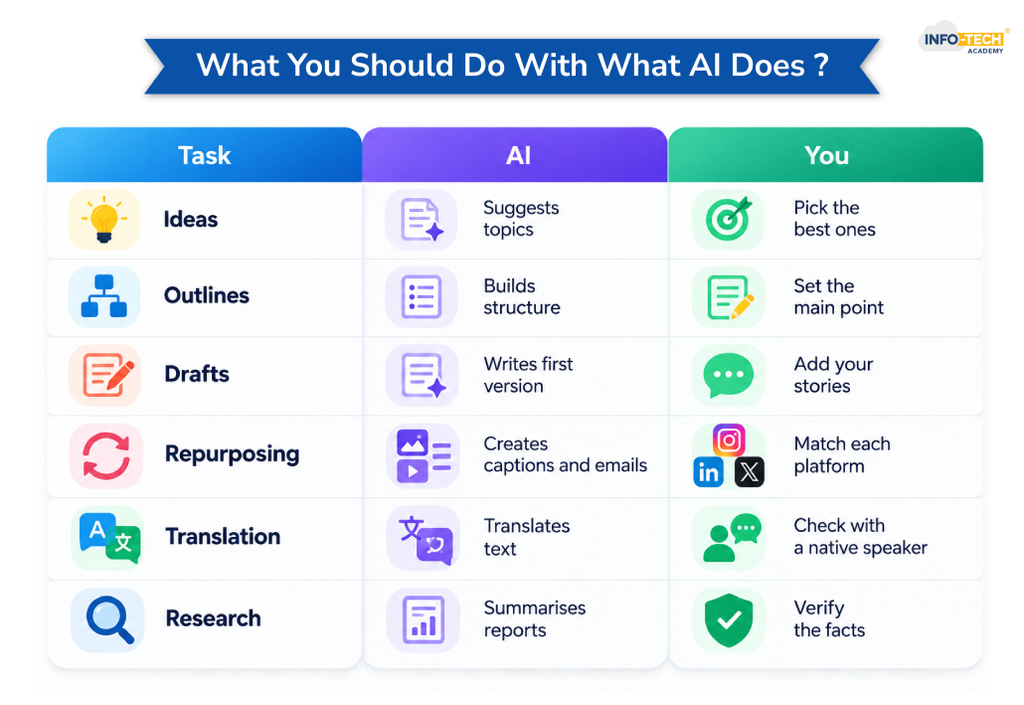
Think of AI as a fast junior assistant. Give it the grunt work and keep the parts that need judgment for yourself.
| Task | Let AI do this | Keep this for yourself |
| Brainstorming | Throw out 20 topic ideas or angles | Pick the ones your audience actually cares about |
| Outlines | Suggest a structure for a post | Decide the main point you want to make |
| First drafts | Write a rough version to react to | Add stories, examples and opinions |
| Repurposing | Turn one blog into captions, an email or a short script | Check the tone fits each platform |
| Translation | First pass into BM or Chinese | Have a native speaker review it |
| Editing | Fix grammar, tighten long sentences | Make the final call on what stays |
| Research | Summarise reports or long articles | Verify every number and claim |
A simple rule: the more a piece depends on trust, like a founder’s story or a customer case study, the less of it AI should write.
How Do I Get AI To Write in My Brand’s Voice?
Give it more to work with. A one-line prompt gets a generic answer, while a prompt with context gets something much closer to how you’d write it yourself. Before you ask for a draft, tell the AI:
- Who you’re writing for (age, job, what they’re struggling with)
- Two or three samples of your past writing that you’re happy with
- Words and phrases you never use
- How formal or casual you want it to sound
- Any local details that matter, like pricing in RM or a festive season you’re planning around
Here’s a quick before and after:
| Weak prompt | Better prompt |
| Write a post about our new cafe menu. | Write a short Instagram caption for our new nasi lemak burger. Our followers are working adults in PJ who like trying new food. Keep it casual and a bit cheeky, under 40 words, no hashtags. Here are two captions we’ve posted before so you can match the tone: […] |
It also helps to save your best prompts so your whole team uses the same starting point. If you want to get properly good at this, our 2-day Smart Prompting Course goes deep into writing prompts that get usable results on the first or second try.
Your CRM is also a goldmine here. It already shows what customers buy, ask about and complain about, and those insights make your prompts far more specific. Just share the patterns, not personal customer details. Our CRM Software training shows you how to pull that kind of insight out of your customer data.
How Do I Make an AI Draft Sound More Human?
Treat the draft as clay, not the finished product. You’re not alone in doing this either. According to HubSpot, 56% of marketers heavily revise AI content or rewrite it completely before publishing. A few things that make the biggest difference:
- Add something only you know: A customer conversation, a mistake you made, a number from your own sales and personal experience. This is the one thing AI can’t fake.
- Say what you actually think: If you believe something is overrated, say so. A clear opinion is more memorable than a balanced summary.
- Bring in local flavour: Mention places, habits and moments your readers recognise, whether it’s the CNY rush, mamak sessions or Monday traffic on the Federal Highway.
- Cut the filler: Delete any sentence that doesn’t add something new. AI loves to restate the same point three ways.
- Mix up your sentence length: Short ones hit hard. Longer ones carry the reader through an idea. AI tends to make them all about the same.
- Read it out loud: If you wouldn’t say it to a client over coffee, rewrite it.
Check out: AI for Everyday Practical Work to Boost Productivity
How Do I Make Sure AI Content Is Accurate and Safe to Publish?
One wrong figure can undo all the trust your voice has built. Run through this quick check before anything goes live:
- Every statistic traced back to its original source, not just “a study says”
- Any mention of local rules, like PDPA or SST, confirmed against official sources
- Links clicked and working
- Dates, prices and product details up to date
- No made-up quotes or testimonials
Also be careful about what you paste into AI tools in the first place. A 2025 LayerX Security report found 77% of employees had shared sensitive company data through public AI tools. Keep customer details, contracts and internal financials out of free chatbots unless your company has approved the tool for that use.
Read also: AI Trends Professionals Must Know
Which AI Tools Are Best for Content Creation?
There’s no single best tool. Most people end up using two or three depending on the job.
| Tool | What it’s good for |
| ChatGPT | Quick brainstorming, first drafts, social captions |
| Claude | Long-form writing, editing, working with long documents |
| Google Gemini | Research and anything inside Google Docs or Gmail |
| Microsoft Copilot | Drafting directly in Word, Outlook and PowerPoint |
| Canva Magic Studio | Social graphics and simple visuals in your brand colours |
Knowing which tool fits which task saves a lot of trial and error. Our AI course compares ChatGPT, Claude, Gemini and Copilot side by side over two days. If your team mainly uses ChatGPT, the 1-day ChatGPT course is a faster way in. And if a lot of your content lives in Word, Excel and email, Office Skills course helps you work faster in the apps you already use every day.
Register NowAI Content Creation FAQs
How do I create AI content?
To create AI content, choose a tool like ChatGPT or Claude, give it clear context about your audience and tone, ask for an outline before the full draft, refine it step by step, then add your own stories and fact check everything before publishing.
Can I use AI for content creation?
Yes, you can use AI for content creation, as long as you treat it as only a helper for brainstorming, drafting and editing while you add the personal insight, local context and fact checking that keep your content trustworthy.
Can AI content be used officially?
Yes, AI content can be used officially for business, marketing and even formal documents, as long as a person reviews it for accuracy, it follows your company’s policies, and it doesn’t include confidential or customer data that shouldn’t have gone into an AI tool.
How can I find out if a content is AI generated?
You can spot AI generated content by looking for generic phrasing, sentences with a similar rhythm, no personal stories, and stats or quotes without real sources. Tools like GPTZero, Originality.ai and Copyleaks can also help, but treat their scores as a hint rather than proof since they’re not always accurate.

Transforming thoughts and concepts into clear, compelling words is a powerful tool that connects people. While writing boosts my creativity, reading broadens my perspective and sharpens my understanding of language and narration.